PM Kisan KYC kaise kare?
What You'll Learn
- Why PM-KISAN eKYC is mandatory for registered farmers
- How OTP, biometric and face-authentication routes differ
- How to read the eKYC status after completing a method
- What to do when OTP, Aadhaar, name or biometric checks fail
What Is PM Kisan eKYC 2026?
PM Kisan eKYC 2026 is the identity-verification process used for registered PM-KISAN farmers. The official PM-KISAN homepage states that eKYC is mandatory. It is one part of the benefit process, not a replacement for land verification, eligibility checks, family checks or bank-payment routing.
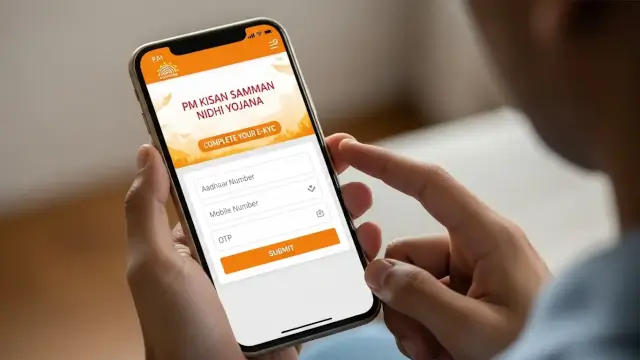
eKYC helps connect the farmer record with an Aadhaar-based identity check. The official process note lists three ways to complete it. A farmer can use an Aadhaar-linked mobile for OTP verification, visit an authorised CSC or State Seva Kendra for biometric verification, or use face authentication through the PM-KISAN mobile application.
The distinction matters because the three routes do not require the same equipment. OTP needs an active mobile number linked with Aadhaar. Biometric verification needs an authorised operator and a supported device. Face authentication needs the official mobile app and the required Aadhaar Face RD application.
Completing eKYC does not guarantee that the next instalment will be credited. The record can still have a land, family, bank or exclusion issue. Treat eKYC as a required identity gate, not as a promise of payment.
Which Official eKYC Methods Are Available?
The official PM-KISAN process note identifies three methods. Use the route that matches the information and equipment available to you. Do not give an OTP or Aadhaar details to an agent using an unknown website.
| Method | What you need | Official route |
|---|---|---|
| OTP-based eKYC | Aadhaar-linked active mobile | PM-KISAN portal or mobile app |
| Biometric eKYC | Aadhaar details and an authorised operator | CSC or State Seva Kendra |
| Face-authentication eKYC | PM-KISAN app, Aadhaar Face RD app and consent to scan | PM-KISAN mobile app |
| Status check | Beneficiary record and registered details | Know Your Status or Kisan eMitra where available |
The official note says that the status completed through any mode can be reflected in beneficiary status after 24 hours. That statement concerns the status display. It is not a 24-hour promise for bank credit or an instalment release.
The site’s PM Kisan official date and status guide explains how eKYC fits into the larger payment check. Read it when the eKYC field is complete but the payment record still needs investigation.
How to Complete OTP-Based PM-KISAN eKYC
OTP verification is the route most farmers try first because it can be completed online. It requires an active mobile number linked with Aadhaar. If the mobile link is missing or the record does not match, the OTP route may stop before verification.
- Open the official PM-KISAN website at pmkisan.gov.in.
- Select the eKYC option shown on the official portal.
- Enter the Aadhaar number requested by the page.
- Request the OTP sent to the Aadhaar-linked active mobile number.
- Enter the OTP and submit the verification request.
- Read the result shown by the portal and keep a screenshot or reference if one appears.
The official process note does not require a third-party form. If a page asks for a bank password, UPI PIN or an OTP before showing the official PM-KISAN domain, close it.
Do not assume that an Aadhaar-linked mobile in your name will always produce a successful result. The PM-KISAN record can contain a separate identity, registration or correction issue.
How Biometric eKYC Works at a CSC or SSK
Biometric eKYC is the practical alternative when the OTP route cannot be completed. The official note says the service is available at Common Service Centres and State Seva Kendras. An authorised operator assists with Aadhaar-based biometric verification.
- Find an authorised CSC or State Seva Kendra.
- Carry your Aadhaar card and Aadhaar-linked mobile number.
- Tell the operator that you need PM-KISAN eKYC, not a general bank service.
- Follow the operator’s instructions for the Aadhaar-based biometric check.
- Ask for the transaction or confirmation detail shown after completion.
- Check the PM-KISAN beneficiary status after the stated reflection period.
The official process note states a convenience fee of ₹15 for eKYC. Ask for a receipt. A different charge should be explained before the service is completed, and no operator should ask for an OTP to be handed over verbally when the device is in your own hands.
Biometric verification does not change the other scheme checks. It cannot correct a wrong land record, remove a family-level hold or map a closed bank account.
For a separate land and farmer-record example, read the site’s UP Farmer ID guide. It is not a substitute for PM-KISAN eKYC, but it helps explain why local records can affect government-scheme work.
How to Complete Face-Authentication eKYC
Face-authentication eKYC is available through the PM-KISAN mobile app. The official process note also refers to the Aadhaar Face RD app. This route uses the phone camera and requires consent to scan the face. It is not the same as uploading a selfie to an unknown website.
- Download the official PM-KISAN mobile app and the Aadhaar Face RD app from the recognised app store.
- Open the PM-KISAN app and log in through the registered mobile route shown by the app.
- Open the beneficiary status page.
- If the eKYC status is “No”, choose the eKYC option.
- Enter the Aadhaar number requested by the app and give consent to scan.
- Complete the face scan in the app and read the resulting status.
Lighting, camera access, device permissions and identity-record quality can affect the result. A failed face scan does not prove that the farmer is ineligible. Try the official troubleshooting steps or use an authorised biometric route instead.
Never install an app file sent through a message. Use the official app-store listing and verify the publisher before entering Aadhaar details.
How to Check PM-KISAN eKYC Status
The official process note says the status of eKYC completed through any method may be reflected in beneficiary status after 24 hours. Use the official Know Your Status page to read the current record. The page can also show payment fields such as bank name, UTR and credited-on date.
| Status view | What it tells you | What it does not tell you |
|---|---|---|
| eKYC completed | The identity-verification field is marked complete | It does not prove bank credit |
| eKYC not done | The official record still shows the requirement as incomplete | It does not explain every possible cause |
| Payment pending or failed | A payment or routing issue needs another check | It does not automatically mean eKYC alone caused it |
| Beneficiary list entry | The name appears in the public location-based list | It does not replace private status details |
If the status remains unchanged immediately after completing a method, wait for the official reflection period before assuming the transaction failed. If it remains unchanged after that period, save the displayed message and use the correction or grievance route.
The site’s PM Kisan beneficiary status guide explains why the public list, private status and bank statement should be read as separate records. For a separate status-without-OTP discussion, read the site’s PM Kisan status explainer.
What to Do When the OTP Does Not Arrive
Start with the simplest checks. Confirm that the mobile number is active, linked with Aadhaar and available to receive messages. Check whether the portal has accepted the Aadhaar number and whether the phone has network access.
Do not keep sending requests through several unofficial pages. That creates more risk without correcting the underlying record.
- Wait briefly and request a fresh OTP through the official portal.
- Confirm that the Aadhaar-linked mobile is the number you can access.
- Check the Aadhaar and PM-KISAN record for a spelling or identity mismatch.
- Use an authorised biometric CSC or State Seva Kendra if OTP verification remains unavailable.
- Keep the exact error message if you need to raise a correction or grievance.
An Aadhaar mobile update may need to be completed through an authorised Aadhaar service route. PM-KISAN cannot change every Aadhaar record from the eKYC page.
How to Handle Name, Aadhaar and Record Mismatches
A name mismatch can happen when the spelling in Aadhaar, land records, bank records and the PM-KISAN registration differs. The fix depends on which record is wrong. Do not ask a CSC operator to “adjust” a name without an official correction record.
| Mismatch | First place to check | Likely correction point |
|---|---|---|
| Aadhaar name differs | Aadhaar identity record | Authorised Aadhaar update route |
| Bank name or mapping differs | Bank account and Aadhaar mapping | Bank branch or bank-authorised channel |
| Land record differs | State land or revenue record | Relevant State agriculture or revenue office |
| PM-KISAN registration differs | Registration and status record | Official correction or self-registration route |
The official PM-KISAN correction and update route can help identify the appropriate self-registered farmer update flow. Use the live form instructions rather than relying on a copied screenshot.
Completing eKYC while a different record remains wrong may leave the benefit status unresolved. One green field does not clear every check.
Does eKYC Guarantee the PM-KISAN Instalment?
No. eKYC is mandatory for registered PM-KISAN farmers, but it is one condition in a larger process. The scheme also considers land, family, exclusion and payment-routing information. A payment can still be held when the record needs physical verification or the Aadhaar-to-bank route is not mapped correctly.
The PM-KISAN homepage identifies suspected cases such as land acquired after 1 February 2019 or more than one family member receiving benefits. It says benefits in such cases can be temporarily withheld until physical verification. This is why a completed eKYC field should not be presented as a guaranteed payment result.
PM-KISAN provides ₹6,000 per year in three equal instalments of ₹2,000 to eligible landholding farmer families. The latest verified 23rd instalment was released on 20 June 2026. eKYC helps establish the identity side of the record, but it does not announce a future instalment date.
For a wider government-scheme reference, see the site’s top government schemes guide. This page remains focused on PM-KISAN eKYC.
Is There a PM-KISAN eKYC Last Date in 2026?
The official pages verified for this article state that eKYC is mandatory, but they do not establish the old article’s universal fixed deadline. Search results and social posts can repeat a date that does not apply to every farmer or every release.
Complete eKYC promptly if your registered record still shows it as incomplete. Before acting on a deadline, check the current message on the official PM-KISAN portal, the status page or an official government notice. A date copied from another website is not enough.
Do not tell a reader that the government will automatically remove the farmer, demand fresh registration or block every instalment on one fixed date. The actual outcome depends on the current scheme rules and the individual record.
What to Do Now
Open the official PM-KISAN portal and choose the eKYC route. Use OTP if the Aadhaar-linked mobile is active. Choose an authorised CSC or State Seva Kendra for biometric verification when OTP does not work. Use the PM-KISAN app and Aadhaar Face RD app for the face-authentication route described by the official process note.
After completion, allow the stated status-reflection period and check Know Your Status. If the field remains incomplete, save the error message and use the correct record holder or official grievance route. Do not pay an agent for a guaranteed result and do not share an OTP or banking password.
That is the useful answer to PM-KISAN eKYC in 2026. Complete the identity check through an official channel, then read the rest of the beneficiary record before assuming that payment is settled.
Frequently Asked Questions

SK Jabedul Haque
Building India's most trusted finance education platform — simplifying news, schemes and market trends so anyone can understand and invest confidently.
Read full bio


Never miss an update
Get our clearest explainers on schemes, markets and money — read what matters, without the noise.
Explore more articles