Yuva Sathi Yojana Online Registration 2026
What You'll Learn
- What the official Yuba Sathi portal currently says about registration
- Which fields appear in the official Banglar Yuba Sathi application form
- How to use the official status and public-notice links safely
- What to do if submission is closed, an OTP fails, or a link looks unofficial
What Is Yuva Sathi Yojana Online Registration 2026?
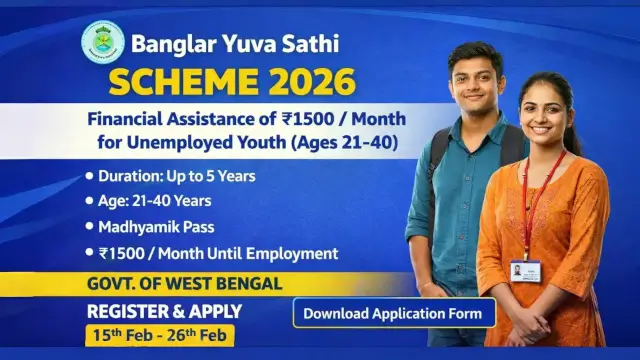
Yuva Sathi Yojana Online Registration 2026 is the search phrase used for West Bengal's Banglar Yuba Sathi assistance programme. The official portal identifies it as a Department of Youth Services & Sports, Government of West Bengal scheme. The application process, eligibility window, and payment conditions must be read from official notices rather than copied from social-media posts.
The programme was presented for eligible unemployed youth in West Bengal, with earlier official materials describing monthly assistance of Rs 1,500 for the applicable cycle. That historical amount must not be treated as a promise of a new payment unless the Department publishes a current notice. A live portal status is more important than an old article or screenshot.
| Question | Safe answer | Official place to verify |
|---|---|---|
| What is the scheme? | Banglar Yuba Sathi under the Youth Services & Sports Department | Official Yuba Sathi portal |
| Is the form open? | The current portal says online submission has ended | Portal announcement and public notices |
| What was the earlier support? | Earlier materials described Rs 1,500 monthly assistance | Applicable notification, not a social post |
| Where is help available? | Official Yuba Sathi Help Desk | 6292248888 and yubasathi2026@gmail.com |
Is Yuva Sathi Online Registration Currently Open?
The official portal currently displays an important announcement that the online application submission period for the scheme has officially ended. The Application Submission and Public Notices links lead to the official closed-submission page. Therefore, this article does not tell readers to submit a new form today or promise that an application will be accepted.
If the Department announces a new window, the portal notice should provide the controlling date and route. Check the official domain directly, read the public notice, and confirm that the page is not an advertisement or an unrelated registration service.
For comparison, the earlier Banglar Yuba Sathi status guide also follows the rule that current portal notices matter more than old application claims.
What Does the Official Application Form Ask For?
The official Banglar Yuba Sathi application form asks for a Duare Sarkar Registration number, Aadhaar number, beneficiary name, mobile number linked with a bank account, account number, email if any, gender, date of birth, and age as on 01/04/2026.
It also includes fields for parents or spouse, category and certificate number, marital status, house or premises, village or town, post office, gram panchayat or ward, block or municipality, police station, district, PIN code, state, and a colour photograph. These are form fields, not a guarantee that submission is open.
Keep copies of any acknowledgement and do not send Aadhaar, banking information, OTPs, or photographs to an unofficial agent. Read this West Bengal scheme guide for the same document-verification principle in another government programme.
Who May Have Been Eligible for the Applicable Cycle?
Earlier official programme materials described eligibility around West Bengal residence, youth status, education, employment condition, and the Department's notified criteria. Public summaries commonly refer to an age band of 21 to 40 years and a Class 10 or equivalent qualification, but readers must check the applicable official notice for the cycle they are applying under.
Eligibility is not the same as current registration availability. A person may match historical criteria and still be unable to submit while the portal is closed. Do not pay a fee to someone who claims to unlock a closed government form.
How Should Applicants Use the Official Portal?
Start at yubasathi.wb.gov.in. Use only the official Application Status, Public Notices, and any future submission link shown there. Check the spelling of the domain, read the announcement, and save a copy of the page or notice for your records.
If a future window opens, follow the exact instructions in the official notice. Enter information only on the government page, review the form before submitting, and keep the acknowledgement number. Do not rely on a search advertisement that asks for payment or redirects to a private WhatsApp number.
| Portal step | What to do | What to avoid |
|---|---|---|
| Open the portal | Type the official domain directly | Using copied links from messages |
| Read the notice | Confirm window, criteria, and route | Assuming an old date is still valid |
| Complete a form | Use the official page and review entries | Sharing OTP or login data with an agent |
| Save proof | Keep acknowledgement or status reference | Deleting the only receipt or screenshot |
How Can You Check Yuva Sathi Application Status?
The official portal provides an Application Status link. Use that link rather than an unofficial status website. The status page may require the reference details created during a valid application, so a person who never submitted a form may not receive a result.
If the page is unavailable, check the official Public Notices section and contact the help desk. Avoid repeatedly entering personal details into mirror pages. A status message should be interpreted together with the official notice and the information shown on the application receipt.
| Status or message | What it may mean | Safe next step |
|---|---|---|
| Submission period ended | New online forms are not currently being accepted | Wait for an official reopening notice |
| Application reference found | An earlier submission may have a trackable record | Save the status result and follow the notice |
| No record found | Reference may be wrong or no valid submission exists | Check the receipt and contact the help desk |
| Portal unavailable | Maintenance, closure, or technical issue may be present | Check Public Notices before retrying |
For another example of safe beneficiary verification, see the PM Kisan list-check guide, which also separates a status lookup from a new application.
What If the Registration Window Has Ended?
When the official portal says submission has ended, there are only safe next steps. Check Public Notices for a reopening or correction notice, use the Application Status page if you already have a reference, and contact the listed help desk for a genuine query. Do not treat a private form as an alternative government window.
Keep the documents that the official form requests ready, but do not upload them until an official submission window is open. If a new notice changes the age cutoff, payment terms, or district process, the new notice controls the decision.
What Should You Do If OTP or Portal Access Fails?
First check the official domain, network connection, mobile number, and whether the portal has announced closure or maintenance. Do not ask an agent to use your OTP. The official portal lists the Yuba Sathi Help Desk at 6292248888 and yubasathi2026@gmail.com for assistance or queries.
Describe the problem without sending passwords, full banking credentials, or one-time codes. Keep a screenshot of the error, the time, and any application reference. If a future official notice provides a different support channel, use that notice rather than an old number copied elsewhere.
How Are Documents and DBT Details Checked?
The official form includes Aadhaar, bank-linked mobile, account, address, category, and identity fields. Earlier programme guidance also referred to Aadhaar-linked direct benefit transfer checks. The purpose of collecting these details is to match the applicant and payment record, but the exact verification rule depends on the applicable official cycle.
Make sure the name and basic details are consistent across the documents used for a valid application. If a bank or Aadhaar mismatch is reported, contact the official help desk or the authority named in the notice. Never pay an intermediary to “activate” a benefit.
| Record | Why it may matter | Safe handling |
|---|---|---|
| Aadhaar details | Identity and benefit matching under the applicable process | Enter only on the official form |
| Bank-linked mobile | Contact and verification route shown on the form | Never share OTP with another person |
| Account details | Payment routing when notified by the Department | Check the account name and number carefully |
| Acknowledgement | Evidence of a valid submission or reference | Save a copy and use it for status queries |
How Can Applicants Avoid Yuva Sathi Scams?
Common warning signs include a promise to reopen a closed form, a fee for registration, a request for OTP, a private “verification” link, or a claim that approval is guaranteed. Government benefits may have eligibility conditions and administrative delays. No private agent can replace the official notice.
Use the official portal and help desk, compare the domain carefully, and report suspicious requests to the relevant authority. Do not publish another person's Aadhaar, bank account, phone number, or application receipt in a public group.
For a related document-safety example, read the Samudra Sathi verification guide and keep the same rule: official notice first, payment claim second.
What Is the 2026 Registration Checklist?
Before acting, confirm the official domain, read the latest notice, check whether submission is open, review the eligibility cutoff, prepare the fields shown in the official form, and save the acknowledgement after a valid submission. If the window is closed, wait for an official update instead of using an unofficial link.
Use the portal's Application Status option for an existing reference and the listed help desk for a genuine technical query. Treat monthly support, payment dates, and reopening claims as unverified until the Department publishes them.
Conclusion: What Is the Safe Registration Answer?
As of this guide's August 2026 update, the official Yuba Sathi portal says that online application submission has ended. That means the safe answer to Yuva Sathi Yojana Online Registration 2026 is not to search for a shortcut. Check the official portal, status page, public notices, and help desk for the next authorised window.
Earlier eligibility and payment details can help readers understand the scheme, but they do not reopen a closed form. Keep documents ready, protect Aadhaar and OTP information, and rely on the Department's current notice before submitting or sharing any claim.
Frequently Asked Questions

SK Jabedul Haque
Building India's most trusted finance education platform — simplifying news, schemes and market trends so anyone can understand and invest confidently.
Read full bio


Never miss an update
Get our clearest explainers on schemes, markets and money — read what matters, without the noise.
Explore more articles