Interactive Code Blocks: ChatGPT Became a Full IDE
What You'll Learn
- What OpenAI actually announced on February 19, 2026.
- Which Code Block actions are documented and which depend on rollout or account settings.
- Why Code Blocks are not the same product as Codex or a local IDE.
- How a senior developer can use the feature without pretending a preview pane is a production environment.
ChatGPT Interactive Code Blocks are best understood as an improved in-chat editing and preview surface. They reduce the friction between asking for a small piece of code and checking what it looks like. That is useful. It is not the same as replacing a repository, a shell, a debugger, a package manager and a tested deployment pipeline.
The original announcement was short. The surrounding internet was not. A small release-note entry quickly became “ChatGPT became a full IDE,” complete with claims about hot reload, persistent files, one-click debugging and multi-file React projects. Those are attractive headlines. They are also broader than the official documentation supports.
This guide keeps the feature in its proper box. The official source is the ChatGPT Release Notes. The operational details come from OpenAI’s Code Blocks help article.
What did OpenAI announce on February 19, 2026?
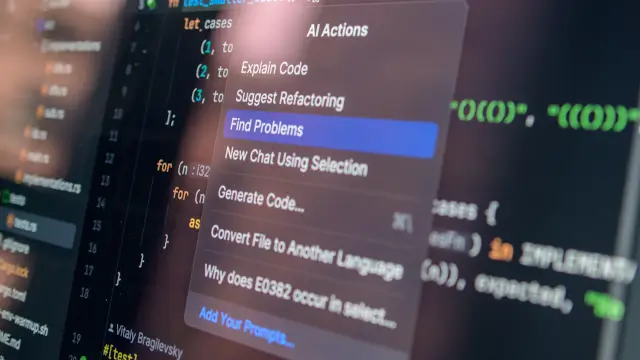
OpenAI’s release note calls the update “Interactive Code Blocks in ChatGPT.” Its wording says Code Blocks were improved to make them more interactive. It then lists three visible changes: users can write and edit text inline, preview diagrams and mini apps directly in chat and review code in split-screen views.
That is the confirmed feature scope. The announcement does not say that every ChatGPT account receives a full terminal, a project-wide file system, hot reload, a debugger with a patch button or a persistent development container. It also does not say that Code Blocks use a special Codex execution model behind the scenes.
The distinction matters because product announcements describe the interface, while developers need to know the boundary. A preview can show whether an SVG renders. It does not prove that a dependency tree is reproducible. An inline edit can fix a typo. It does not prove that a patch passes the repository test suite.
| Officially documented | Not established by the February 19 release note |
|---|---|
| Inline writing and editing | A general-purpose local IDE replacement |
| Previewing diagrams and mini apps in chat | Universal hot reload for every language |
| Split-screen code review | A built-in debugger with one-click patching |
| Interactive Code Blocks in ChatGPT | Persistent project files across every block and account |
The release is still meaningful. It moves code from a static answer toward an object that can be edited and previewed in the same conversation. For small experiments, that removes several copy-and-paste steps. It just does not remove the need to understand what was executed, where it was executed and what was not tested.
What can Code Blocks do in the documented workflow?
OpenAI’s Code Blocks help article describes code blocks as separate areas for code and supported preview content. Depending on the block and the account, a user may be able to copy code, see its language label, edit the code directly, ask ChatGPT to edit it, open it in a larger view and switch between Code and Preview.
Supported previews may include HTML pages, React components, SVG images, Mermaid diagrams and Vega or Vega-Lite charts. That list is more useful than the vague phrase “full IDE” because it tells a developer what to try first. If the block supports a preview, inspect the rendered result. If it does not, treat the output as code text, not as a running application.
The same documentation says supported Python blocks can run in a sandboxed environment and display console output or errors. A user can stop a run that is still active. This is a real execution capability, but it is explicitly scoped to supported Python code blocks. It should not be rewritten as a universal terminal for Python, Node.js, C++, package managers and arbitrary shell commands.
Availability is not uniform. OpenAI says available actions depend on block type, device, plan, workspace settings, model and rollout. A developer who cannot see Preview or Run is not necessarily doing anything wrong. The control may not be available for that block or account.
Our coding AI comparison is useful background, but the same caution applies there. A tool’s most impressive capability is often conditional. Check the actual control in the actual account before designing a workflow around it.
What does “interactive” not mean?
Interactive does not mean that ChatGPT now has the same project model as VS Code, JetBrains or a terminal-first development environment. A local IDE knows about a workspace, files, extensions, language servers, build tools, version control and the machine where the code will eventually run. A Code Block is usually a bounded object inside a conversation.
Interactive does not automatically mean persistent. The help article says edits to supported blocks save with the conversation after a short delay. It also says edits may not persist after a Temporary Chat ends. That is conversation persistence, not the same as a durable repository with branches, commits, review history and reproducible setup.
Interactive does not automatically mean hot reload. A preview can update when the supported content is rendered again, but the official feature description does not promise a browser-like hot-reload loop for every language or framework. The old article’s sidecar-terminal language is therefore removed.
Interactive does not automatically mean debugging automation. A console error can help a user ask a better follow-up question. That is different from a documented debugger that understands the whole project and applies a safe patch with a verified test result. Developers should still read the error, inspect the diff and run the tests that matter.
How are Code Blocks different from Codex?
Code Blocks are an in-chat surface for reading, editing, previewing and, where supported, running code. Codex is a separate software-engineering agent workflow. OpenAI’s Codex material describes isolated task environments where the agent can work on a repository, read and edit files and run commands such as tests, linters and type checkers.
That does not make the two products interchangeable. A Code Block is a good fit for a small HTML preview, a Mermaid diagram, an SVG experiment or a supported Python calculation. Codex is designed for a task that needs repository context, file changes, test execution and a reviewable result.
OpenAI’s Codex page also warns that its original launch post is outdated for current product and team workflows. That is a useful warning for anyone writing about fast-moving developer tools. A model name or plan matrix copied from a launch article can become stale while the URL remains live.
Our ChatGPT Workspace Agents article covers a related agent workflow. Keep the product boundaries clear. An agent that edits a repository is not evidence that every code response has repository access.
| Workflow | Best described as | Developer question |
|---|---|---|
| Code Block | In-chat code editing and supported preview | Can this block preview or run the code I need? |
| Codex | Repository-aware software-engineering agent | Can it inspect, modify and test this project safely? |
| Local IDE | Project workspace with local tooling | Can I reproduce, debug and ship this change? |
How does the feature compare with a local IDE?
A Code Block wins on immediacy. The code is beside the explanation, so a user can ask for a small change and inspect the result without opening a separate editor. That is excellent for teaching, interface sketches, data-visualisation experiments and narrow reproduction cases.
A local IDE wins on project depth. It can work with a real directory, a lockfile, environment variables, language servers, test runners, formatters, source control and deployment scripts. Those details are not glamorous, but they are the difference between a screenshot and a maintainable system.
The right comparison is not “which one is the full IDE?” The better question is “which part of the workflow is this tool shortening?” Code Blocks shorten the distance from prompt to inspection. They do not automatically shorten the distance from inspection to production.
Developers evaluating alternatives can read our local Llama and Copilot workflow guide. A local model has its own trade-offs around hardware, latency, context, model quality and maintenance. The point is not that one tool wins every task. The point is to name the boundary before the tool becomes part of the architecture.
What about Python execution, packages and network access?
The official Code Blocks documentation supports a narrower statement than the original FAQ. Supported Python code can run in a sandboxed environment and show output or errors in a console. The documentation does not establish that every code block can run arbitrary shell commands, install packages with pip or npm, access a cached package repository or retain a project environment across unrelated conversations.
Previews may need outside resources. OpenAI says ChatGPT may ask for permission before connecting to them, and workspace administrators can control whether code execution and network access are available. That is a product and policy boundary, not a minor footnote.
Use the smallest possible test. Render the diagram before adding external data. Run a short Python reproduction before uploading a large dataset. Treat network access as a separate permission. Never paste credentials into a Code Block just because the interface looks like a terminal.
When a result matters, reproduce it locally or in the project’s real CI environment. A sandbox can expose a logic error, but it may not match the target operating system, package versions, data volume, network policy or deployment configuration.
For broader model and agent comparisons, see our coding-agent benchmark guide. Benchmarks and previews answer different questions. A benchmark measures a task under a stated setup. A preview shows what the current interface can render.
What should developers use Interactive Code Blocks for?
Use them for a small, inspectable unit of work. An HTML mock-up, an SVG icon, a Mermaid architecture sketch, a React preview or a short Python calculation is a sensible starting point. The output is visible, the scope is limited and the cost of a wrong assumption is low.
They are also useful for explaining code. A developer can place a snippet and its preview in the same conversation, then ask for a focused edit. A reviewer can inspect the change without scrolling through a long answer. That is a real usability improvement, even if it does not deserve the “entire IDE” label.
Be more cautious with authentication code, payment flows, production database migrations, security controls and anything that depends on exact infrastructure. A preview can look correct while omitting the failure paths that matter. The more expensive the failure, the less acceptable a visual check becomes as the only test.
Our memory-architecture guide is another example of why terminology matters. A system can be described as handling a large context or memory workload without being the same thing as a durable application database. Product metaphors are not architecture diagrams.
How should a senior developer evaluate the feature?
Start with the capability you can observe. Does the block expose Code and Preview? Does the selected language render correctly? Does Run appear for supported Python? Is the output reproducible after a fresh conversation? These are better checks than assuming a launch headline applies to the account in front of you.
Next, record what the sandbox did not test. A successful preview does not test accessibility, browser compatibility, dependency security, performance, persistence or deployment. A successful Python run does not test a production database, a private network or a long-running worker.
Then move the result into the correct engineering surface. Put a real feature in the repository. Add a test. Run the project’s formatter and type checker. Review the diff. If the change affects users, use the ordinary release process. The Code Block can be the fast first pass. It should not be the last gate.
OpenAI’s own Codex documentation makes a similar point in a different context: agent-generated code still needs human review and validation before integration and execution. That principle applies even more strongly when a developer is tempted to confuse an attractive preview with a finished implementation.
Final verdict: useful coding surface, not a universal IDE
The February 19, 2026 update is real and useful. ChatGPT Code Blocks became more interactive. Users can edit code inline, preview supported diagrams and mini apps and review code in split-screen views. Supported Python execution can open a sandboxed workspace with console output, subject to the block and account capabilities.
The original “ChatGPT became a full IDE” headline goes too far. The official sources do not establish universal terminal access, hot reload, persistent project files, a one-click debugger, package installation, a specialized execution model or a 40% productivity result. Those claims are removed because the page should tell developers what they can verify, not what a product metaphor suggests.
If Code Blocks fit the small experiment, use them. If the task needs repository context, dependency control, repeatable tests or deployment evidence, use Codex or a real development environment that provides those controls. The useful question is not whether ChatGPT replaced the IDE. It is which manual step the new block actually removes.
Frequently Asked Questions

SK Jabedul Haque
Building India's most trusted finance education platform — simplifying news, schemes and market trends so anyone can understand and invest confidently.
Read full bio


Never miss an update
Get our clearest explainers on schemes, markets and money — read what matters, without the noise.
Explore more articles