Cursor vs GitHub Copilot vs Claude Code
What You'll Learn
- How Cursor, GitHub Copilot and Claude Code differ by interface and coding workflow.
- Which documented features matter for completion, chat, codebase work, terminal tasks and review.
- How to compare permissions, privacy controls, model choice and usage limits without relying on old claims.
- How to run a fair evaluation with the same repository, tasks, tests and review standard.
What This Comparison Measures
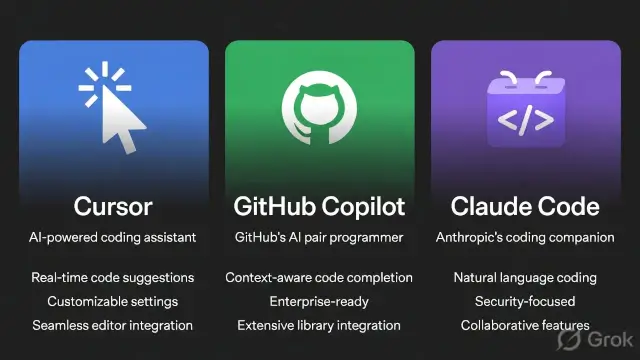
A coding assistant comparison should begin with observable work rather than a leaderboard. Cursor, GitHub Copilot and Claude Code can all help with software tasks, but the products place that help in different surfaces. Cursor presents an AI-first editor and Agent workflow. GitHub Copilot works inside supported development tools and GitHub workflows. Claude Code is designed for work across the terminal, IDE extensions, desktop and web surfaces.
The official product pages describe capabilities, not a guarantee that every developer will save the same amount of time. Results depend on language, repository size, tests, permissions, model selection, prompt quality and the developer's review habits. A tool that feels fast on a small application may not be the right fit for a large monorepo or a restricted enterprise environment.
This article therefore separates three questions. First, where does the assistant operate? Second, what actions and context can it use? Third, what controls and costs must a team verify before adoption? The same method is useful in our AI coding assistants overview, which treats product features as documented capabilities rather than promises of productivity.
Version numbers and plan terms change quickly. The links in this article point to official documentation available during the review. Before choosing a plan or deploying a tool, confirm the current terms, supported models, data settings and usage limits on the provider's own site.
Cursor in an AI-First Editor
Cursor's official Agent documentation describes an assistant that can complete complex coding tasks independently, run terminal commands and edit code. It says the workflow combines instructions, tools and a selected model. The documented tools include file editing, codebase search and terminal execution, which makes Cursor more than an inline completion panel.
The editor-first design matters because the developer can keep the project open while asking the assistant to inspect related files, propose a change and make edits. The important boundary is review. An agent can change multiple files or run commands, but the developer still needs to inspect the diff, run tests and confirm that generated changes match the repository's conventions.
Cursor's models and pricing documentation says the product supports models from several providers and separates usage into pools. It describes a Cursor Models pool and an Other Models pool for third-party models, with plan-specific conditions. That structure means a plan comparison should record which pool a workflow uses rather than comparing only a monthly headline.
Cursor may fit a developer who wants an editor centred on project context and agent tasks. It may be less convenient when a team requires one standard IDE, strict command approval or a GitHub-native review process. Those are workflow questions, not proof that the product is faster or more capable in every project.
GitHub Copilot in Existing Development Tools
GitHub's official documentation describes Copilot as an AI coding assistant that helps developers write code. The documented features include code suggestions as a developer types in an IDE, chat about code, command-line help and Copilot Spaces for organising and sharing context.
The main distinction is integration. Copilot can meet developers inside tools they already use, which can reduce the need to change editors or introduce a separate application. GitHub also connects Copilot with its own repository and collaboration environment. The exact feature set depends on the surface, plan and current product configuration, so an evaluation should name the IDE, repository settings and plan used.
Inline completion is useful when the developer knows the local shape of a function and wants a suggestion while typing. Chat can support explanation or transformation tasks. Command-line help can assist with shell questions, but commands should still be checked before execution. Copilot Spaces can organise context, but more context is not automatically more accurate context.
Copilot may fit a team that already standardises on GitHub and wants assistance embedded in familiar tools. It may not provide the same editor-first experience as Cursor or the same terminal-led operating model as Claude Code. The comparison should measure the actual task and review process rather than repeat the label of industry standard.
Claude Code Across Terminal and IDE
Anthropic's Claude Code overview describes an AI-powered coding assistant that can build features, fix bugs and automate development tasks. It says Claude Code can understand an entire codebase and work across multiple files and tools. The official overview lists terminal, IDE extensions, desktop, web and JetBrains surfaces.
The terminal-first option changes the interaction pattern. A developer can provide a task, let Claude Code inspect the repository and ask for a patch or explanation while keeping normal command-line tools in the loop. The assistant can also be used in a code review or automation flow, but the permission model and repository access should be checked before a task is allowed to make changes.
The official overview also describes custom instructions through a CLAUDE.md file, skills for repeatable workflows, hooks for commands before or after actions and custom agents. These features can help a team document conventions and repeat checks. They can also create maintenance work, because instructions and hooks must stay accurate as the repository changes.
Claude Code may fit developers who prefer terminal control, repository-wide tasks and explicit automation. It may be less attractive to someone who wants only lightweight inline suggestions inside an existing editor. The product's broad surface area is a capability to assess, not a reason to assume that every task requires it.
Cursor vs GitHub Copilot vs Claude Code at a Glance
The following table summarises the documented product emphasis. It does not rank quality, speed or value. Each row should be tested against the same repository, task description and acceptance tests.
| Dimension | Cursor | GitHub Copilot | Claude Code |
|---|---|---|---|
| Primary surface | AI-first editor with Agent workflow | Supported IDEs, chat and GitHub-connected surfaces | Terminal, IDE extensions, desktop and web |
| Documented interaction | Instructions, codebase search, file edits and terminal commands | Inline suggestions, chat, command-line help and Spaces | Repository tasks across multiple files and tools |
| Context question | How well the editor and Agent use project context | How well the selected surface organises relevant context | How well the task, repository and instructions are scoped |
| Evaluation risk | Unreviewed multi-file or command changes | Over-trusting a completion or chat answer | Broad permissions or stale project instructions |
A fair comparison should not force each product into the same interface. Instead, give each product the task it is designed to handle, then use the same definition of done. That definition can include passing tests, a readable diff, no new security warning, correct documentation and a human review. For another example of separating a documented process from an individual result, see our credit-score guide.
Which Workflow Fits Cursor?
Cursor is worth testing when the main problem is moving between files, understanding a codebase and turning a written requirement into a reviewed patch. The Agent documentation specifically highlights file editing, codebase search and terminal tools. A test should therefore include a multi-file change, a targeted search and a command that can be safely inspected.
Start with a small branch or disposable copy. Ask the assistant to describe the files it plans to change before allowing edits. After the change, inspect the diff, run the repository's existing tests and compare the output with the original requirement. This process measures how useful the editor context is without treating autonomous action as a substitute for review.
The models and pricing page should also be checked during a trial. Cursor describes separate usage pools and plan conditions, so the relevant question is how the selected model and workflow consume the available pool. Track task count, model choice and whether extra usage was needed. Do not transfer one developer's usage result to another team's project without measuring both.
Cursor's documented capabilities do not prove that it understands every repository or that its output is secure by default. Add a code-review step and keep secrets out of prompts and test fixtures. Our AI and future-of-work analysis makes the same distinction between a tool's potential and a measured workflow result.
Which Workflow Fits GitHub Copilot?
GitHub Copilot is worth testing when developers want assistance without leaving a familiar editor or repository workflow. The official feature list covers inline suggestions, chat, command-line help and Spaces. Test each surface separately because a completion task, a debugging conversation and a repository-context task are different workloads.
For inline suggestions, use a set of small functions with known tests and record whether the suggestion was accepted, edited or rejected. For chat, use questions with a verifiable answer such as explaining a local function or proposing test cases. For command-line help, review every command before running it. For Spaces, check whether the organised context stays relevant and current.
Copilot's integration can be useful for teams that already manage code, issues and pull requests in GitHub. It does not remove the need to protect source code, review generated output or define which repositories and extensions may use the service. A platform fit should be measured alongside privacy, administration and audit requirements.
Do not claim that Copilot is the easiest or most accurate tool for every developer. The official documentation establishes the available features. It does not establish a universal productivity percentage for your language, editor, codebase or team. Compare accepted changes, test results and review time on your own work.
Which Workflow Fits Claude Code?
Claude Code is worth testing when the work is repository-wide, terminal-led or connected to repeatable development routines. The official overview describes tasks across multiple files and tools, along with terminal, IDE, desktop and web surfaces. It also describes CLAUDE.md instructions, skills, hooks and custom agents.
A safe evaluation can start with a read-only codebase explanation. Next, request a small bug fix on a branch and require a test run. Then try a repeatable task such as checking changed files for a known rule. Record what the assistant inspected, which commands it used, what it changed and how much human correction was required.
Custom instructions can preserve project conventions, but they are not a substitute for tests. A stale instruction file can send the assistant in the wrong direction. Hooks can enforce useful checks, but a hook that fails or makes hidden changes can confuse the workflow. Keep automation visible and document who owns it.
| Claude Code capability | Useful evaluation | Control to verify |
|---|---|---|
| Terminal work | Ask for a command explanation before execution | Permission prompt, working directory and command output |
| Multi-file changes | Use a small issue with explicit acceptance tests | Diff scope, tests and rollback path |
| CLAUDE.md instructions | Add one repository convention and test compliance | Instruction ownership and freshness |
| Skills and hooks | Run one documented repeatable check | Trigger conditions, logs and failure handling |
Claude Code's broad workflow can be powerful for a technical team, but the same breadth increases the importance of permissions and repository boundaries. Keep production credentials and unrelated repositories outside the working context unless a reviewed policy explicitly permits access.
How to Compare Privacy, Permissions and Data Handling
Privacy should be compared from current product documentation and the exact plan, not from a general statement that a tool is private. Check what data may leave the editor, how prompts and code are handled, whether training controls differ by plan, how administrators configure retention and whether extensions or integrations create separate data paths.
Permissions are equally important. An assistant that can edit files or run commands needs a clear boundary around the working directory, network access, secret files and destructive operations. A tool can be useful while still requiring a developer to approve commands and inspect the resulting diff.
Use a test repository containing synthetic credentials and harmless fixtures. Do not paste real passwords, API keys, customer data or proprietary material into a comparison prompt. Confirm that the provider's current privacy and security documents match the plan that would actually be purchased.
| Control area | Question to ask | Evidence to record |
|---|---|---|
| Training and retention | What controls apply to this exact plan and account type? | Current provider policy and selected settings |
| File access | Which folders and files can the assistant read or edit? | Workspace configuration and access test |
| Command execution | Which commands require approval and where are results logged? | Permission screen, command log and review record |
| Integrations | Do GitHub, terminal, MCP or extensions introduce another data path? | Enabled integrations and administrator policy |
Security claims should remain narrow. A documented control reduces a specific risk, but it does not prove that generated code is secure or that a team configured the control correctly. Run dependency checks, secret scans and human review as separate controls.
How to Compare Cost and Usage
Cost comparison is difficult when providers change plans, model access and usage accounting. Cursor's official pricing documentation describes usage pools and model-specific conditions. GitHub Copilot and Claude Code also have plan and account rules that can change. Record the price page date, selected plan, model, task volume and any extra usage instead of quoting an old universal monthly figure.
Measure cost per accepted and reviewed change, not cost per message. A cheap suggestion that needs extensive correction may cost more staff time than a longer task that produces a clean, tested diff. The reverse can also be true when a simple completion would have been enough. The same feature-versus-workflow distinction appears in our expense-tracking tools comparison.
For a small trial, use the same repository and task set with each assistant. Log setup time, waiting time, accepted output, manual edits, test failures, tool calls and usage notices. Do not use a single developer's informal bill as proof that one product is cheaper for every team.
| Measure | How to collect it | Why it helps |
|---|---|---|
| Plan cost | Record the current official plan page and billing terms | Prevents stale price comparisons |
| Usage consumption | Log model, task type and usage-pool events | Shows what actually consumes the allowance |
| Human correction | Record edits, rejected output and review minutes | Captures labour outside the subscription |
| Quality result | Use tests, diff review and issue acceptance criteria | Separates fast output from usable output |
There is no reliable universal answer to which tool is cheapest without a defined workload. A developer who mostly wants inline completion and a team that needs repository automation are not buying the same service, even when the product names appear in the same comparison.
A Practical Evaluation Checklist
Choose three to five tasks that represent real work but do not expose confidential data. Include one inline completion task, one explanation or debugging task, one multi-file change, one test-writing task and one documentation or command-line task. Give each assistant the same repository state and acceptance criteria.
Before starting, record the exact product surface, plan, model, extensions, repository commit and system date. Ask each assistant to state its plan. During the task, record files inspected, commands proposed, commands executed, questions asked and points where a human intervened.
After the task, score the result using a simple rubric. Did the tests pass? Was the diff within scope? Were new dependencies justified? Did the tool follow the repository style? Did it introduce a security, licensing or data-handling concern? How much review was required? A score is useful only when the same rubric is applied to all three tools.
Repeat the test on more than one day if usage limits, model routing or service availability can affect results. Keep the output as a small internal report rather than a public claim that one assistant is always best. The bookkeeping tools comparison illustrates why feature lists and workflow fit should be kept separate.
What This 2026 Comparison Can and Cannot Prove
The official pages support a clear product distinction. Cursor documents an AI-first Agent workflow with codebase search, file editing and terminal tools. GitHub documents inline suggestions, chat, command-line help and Spaces. Anthropic documents Claude Code across terminal, IDE, desktop and web surfaces, with repository-wide work and custom instructions or automation features.
Those documents do not prove a universal winner, a fixed productivity gain, a permanent price, complete privacy for every plan or error-free code. They also do not prove that a developer should install all three. The right choice depends on the repository, preferred interface, permission policy, model access, budget, review capacity and team habits.
Use a current official source when a feature, price or privacy term matters. Keep the comparison date and product surface visible. When a tool changes, rerun the relevant task rather than carrying forward an old verdict. This is the only reliable way to keep a fast-moving AI coding comparison useful.
In short, Cursor is the editor-first option to test for project context and agent changes, GitHub Copilot is the integrated option to test for completion and GitHub-connected work, and Claude Code is the terminal and multi-file option to test for repository tasks and repeatable automation. Treat those as starting hypotheses, then decide from measured output, review effort and current provider terms.
Frequently Asked Questions

SK Jabedul Haque
Building India's most trusted finance education platform — simplifying news, schemes and market trends so anyone can understand and invest confidently.
Read full bio


Never miss an update
Get our clearest explainers on schemes, markets and money — read what matters, without the noise.
Explore more articles