Annapurna Bhandar 11-Page Form Controversy: TMC vs BJP & Easy Fill Guide
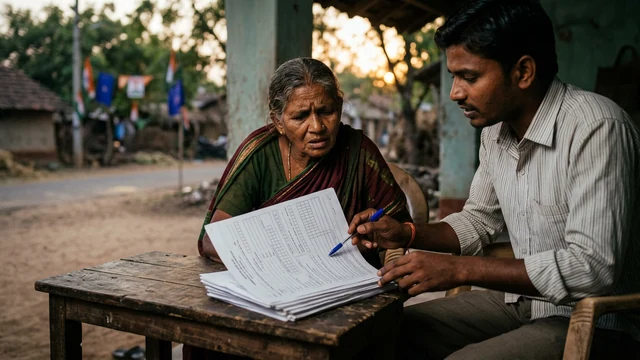
What You'll Learn
- What Annapurna Bhandar is and what the official directory says.
- How to verify the latest eligibility and application instructions.
- How to prepare identity, bank and family documents safely.
- How to avoid scams, duplicate forms and false payment promises.
What Is Annapurna Bhandar in West Bengal?
Annapurna Bhandar is a West Bengal government welfare scheme listed on the central myScheme directory as Annapurna Yojana. The directory describes a monthly benefit of Rs 3,000 for eligible women for empowerment and socio-economic support.
The official benefit description is more reliable than political posts, forwarded messages or a local form seller. Eligibility, application windows, verification steps and payment schedules should be checked against the current government notice and the live portal before a form is submitted.
The current article title refers to an 11-page form controversy. A form can be long because it collects identity, household, bank and declaration details, but page count alone does not prove that an application is invalid or that a payment is guaranteed.
Our Annapurna Bhandar application guide covers the related application-status pathway. Use both articles with the current official notice because welfare instructions can be revised.
What the Official Directory Confirms
The myScheme directory identifies Annapurna Yojana as a scheme of the Government of West Bengal and states a Rs 3,000 monthly benefit for eligible women. That is the clearest verified public description available for this rewrite.
| Item | Verified description | What still needs a live check |
|---|---|---|
| Scheme identity | Annapurna Yojana, also referred to as Annapurna Bhandar in public coverage. | Current department notice and portal wording. |
| State | West Bengal. | District-level implementation instructions. |
| Benefit shown | Rs 3,000 per month for eligible women. | Approval date, payment start and account-credit schedule. |
| Application route | Government portal and notified assistance route. | Current login, form PDF, required fields and submission window. |
Do not treat the directory entry as a substitute for the scheme notification. A directory is useful for discovery, while the department notice and official portal control the current application procedure.
Who Should Verify Eligibility Before Applying?
Applicants should verify the latest age, residence, income, family, employment, benefit-exclusion and bank-account conditions from the current notification. Do not rely on an eligibility list copied into a video description or a social-media post.
Check whether the scheme is intended for women who meet a stated residence condition and whether another government benefit, government employment or household-income rule affects eligibility. If a condition is unclear, ask the local Block Development Office, municipal office or another notified government help point before submitting a declaration.
Eligibility is not the same as approval. A person may satisfy the visible conditions and still need document verification, bank validation, duplicate-beneficiary checks or a district-level decision.
Documents to Keep Ready
Prepare clear copies of the documents named in the latest official form. Depending on the notification, an applicant may need identity details, a West Bengal address or residence proof, bank-account information, a mobile number and family or income details.
Use the applicant's own details consistently across the form, bank record and identity document. A spelling difference, wrong account number or inactive mobile number can delay verification. Do not upload a document that the official form does not request merely because an unofficial checklist includes it.
Before visiting a help centre, keep the originals available for inspection and carry copies only where requested. Do not hand over original identity documents to an unknown agent.
How to Find the Current Official Form
Start from the myScheme entry or the West Bengal government's current scheme notice. The public application route identified in search results is the West Bengal social security portal at socialsecurity.wb.gov.in. Type the address carefully or reach it through a verified government page rather than a shortened link.
Check the domain before entering a mobile number, Aadhaar detail, bank information or one-time password. A website that asks for a fee to download a government form or promises guaranteed approval should be treated as suspicious.
Save the official form version and notice date. If the form changes from one application period to another, the newer notification should control. Do not mix pages from old and new versions when completing a declaration.
How to Complete a Long Application Form
Read the instructions before filling any field. Use the same spelling and date format that appears on the identity and bank documents. If a field does not apply, follow the form instruction for a blank or not-applicable response instead of inserting a random value.
Review the applicant's name, address, mobile number, bank account, branch, IFSC and family details twice. A second person can read the completed form aloud to catch a transposed digit or a missing declaration.
Never sign a blank page. Sign only after reading the declaration and understanding what is being certified. If the applicant cannot read the language used in the form, request help from a government-designated centre or a trusted person and make sure the declaration is explained before signature or biometric confirmation.
Our ABHA registration guide follows the same document-safety practice for public welfare applications.
Online Application Safety Checks
Use a private device or a trusted government assistance centre when entering personal information. Do not share an OTP, banking PIN, ATM PIN, password or full card details with anyone claiming to process the application.
Confirm that the browser address begins with the official portal domain and that the page uses a secure connection. Take a screenshot or save the acknowledgement only after the portal shows a successful submission. A filled draft on a phone is not proof that the department received the application.
If the portal fails, do not submit the same application repeatedly. Note the error time, save the visible reference number and contact the notified office. Duplicate submissions can create confusion during verification.
Offline Help for Applicants Who Need Assistance
Applicants who cannot use the portal should ask the local Block Development Office, municipality, ward office or another officially notified camp about the available offline route. The location and dates of assistance can vary by district and should be checked from a government notice.
Take the original documents for inspection but do not leave them with an unauthorised person. Ask for a receipt, acknowledgement or reference number after submission. If a helper fills the form, the applicant should review the answers and declaration before signing.
Political statements about a form do not replace an application channel. Whether a party calls the form simple or difficult, the official notice and receiving office determine what is accepted.
How Bank Details Affect Payment
Welfare payments sent through direct benefit transfer depend on accurate bank and beneficiary records. Verify the account holder name, account number, IFSC, bank status and any linking requirement stated in the current notice.
Do not assume that a submitted form means payment has started. The department may first check eligibility, identity, duplicate records, bank validation and approval status. The credit date can also depend on the payment cycle.
If a payment is delayed, use the application reference number and the official grievance or office route. Do not pay a private agent to move an application faster or to add a name to a beneficiary list.
How to Check Application Status
Use the status link on the current official portal and enter only the reference details requested there. A legitimate status page should show a clear department or portal identity and should not ask for an unrelated payment, OTP forwarding or bank PIN.
Possible statuses can include submitted, under verification, approved, rejected, returned for correction or payment processed. The exact wording belongs to the live system. Read the reason for a return or rejection and use the notified correction route instead of creating multiple applications.
Keep the acknowledgement, submission date and correction history together. These records help an applicant explain the case to the local office without handing over unnecessary personal information.
Common Errors That Delay Welfare Applications
| Error | Why it causes trouble | Safer practice |
|---|---|---|
| Wrong bank number | Payment or validation can fail. | Compare every digit with the bank record. |
| Name mismatch | Identity checks may not match. | Use the official document spelling and follow correction instructions. |
| Missing declaration | The submission may be incomplete. | Read and sign only the required declaration after it is explained. |
| Unofficial link | Personal data can be exposed to fraud. | Start from myScheme or a verified West Bengal government page. |
| Duplicate submission | Multiple records can complicate verification. | Use the acknowledgement and correction route for one application. |
A long form is easier to manage when each page is treated as a separate verification step. Keep a copy of what was submitted and do not guess an answer simply to finish the form.
How to Spot Annapurna Bhandar Scams
Be cautious if a message promises guaranteed approval, asks for a processing fee, requests an OTP, asks for an ATM PIN or claims that a beneficiary list can be changed privately. Government welfare applications may have service procedures, but an unofficial person cannot guarantee eligibility or payment.
Check the domain, spelling and contact details. Do not trust a logo alone. If a caller says the account will be blocked unless money is sent immediately, stop the conversation and verify through the official portal or office.
Report suspicious collection or impersonation through the appropriate cybercrime, police or department channel. Keep the message, phone number, payment request and screenshot as evidence.
What the Form Controversy Means for Applicants
The title of this article reflects public controversy around a long application form and political criticism. That controversy should not be used as evidence that every field is unnecessary or that every applicant will receive the maximum benefit.
The practical test is whether the current form and notification clearly explain the purpose of each field, the eligibility condition, the documents required and the correction route. If the instructions are unclear, applicants should record the exact field and ask the receiving government office for an answer.
A scheme guide should help an applicant complete a lawful application, not repeat unsupported claims about parties, leakage or guaranteed outcomes. Use the official document version as the final authority.
Our PM-Kisan status guide provides another example of checking a portal status instead of relying on a forwarded beneficiary list.
Practical Checklist Before Submission
Confirm the current notice date, scheme name, eligibility conditions, requested documents, bank details, mobile number, declaration and receiving channel. Review every page with the applicant and save the acknowledgement after submission.
For online applications, use only the verified portal and never share an OTP or banking PIN. For offline applications, use a notified office or camp, ask for a receipt and retain the document copies.
For a correction or rejection, use the official reference number and the notified grievance path. Do not create a second application unless the department instructs you to do so.
Our PM Vishwakarma toolkit explains why application status and document records should be kept together. Readers can also compare the 8th Pay Commission guide for another example of checking a public-policy update against its official notice.
Bottom Line
Annapurna Bhandar, listed as Annapurna Yojana on myScheme, is described as a West Bengal government scheme providing Rs 3,000 per month to eligible women. The amount alone does not confirm eligibility, approval or the date of payment.
Use the current West Bengal notification and official portal to verify the form, documents, eligibility, status and assistance route. Keep personal information private, ask for an acknowledgement and do not pay anyone for guaranteed approval. This guide is general information, not a promise of benefit eligibility or payment.
Frequently Asked Questions

SK Jabedul Haque
Building India's most trusted finance education platform — simplifying news, schemes and market trends so anyone can understand and invest confidently.
Read full bio


Never miss an update
Get our clearest explainers on schemes, markets and money — read what matters, without the noise.
Explore more articles