Adi Vaani App Kya Hai?
What You'll Learn
- What Adi Vaani is, who developed it and why tribal-language access matters
- Which languages were named at the beta launch and what the current web platform publicly shows
- How to use the official web platform for text, speech, OCR and related translation tasks
- How to check accuracy, protect sensitive information and verify future app or language updates
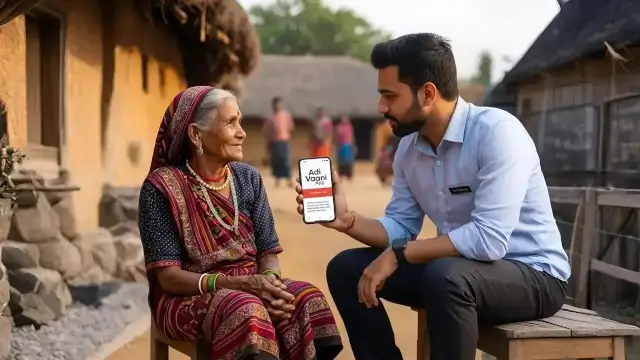
Adi Vaani App 2026 is the current name commonly used for the Ministry of Tribal Affairs' tribal-language translation initiative. The Ministry launched its beta version on 1 September 2025. The Press Information Bureau described it as India's first AI-powered translation platform for tribal languages and said the project was intended to support linguistic preservation, education, healthcare, governance and tribal entrepreneurship.
The current public service is broader than a simple app-store download. The official Adi Vaani web platform presents text translation, OCR, speech-to-text, voice-to-voice, text-to-speech and video-subtitle features. Availability, language coverage and app-store status can change, so this guide distinguishes what the launch release recorded from what the official web platform currently displays.
Key Facts at a Glance
| Item | Verified position |
|---|---|
| Project | Adi Vaani, an AI-powered translation platform for tribal languages |
| Launch | Beta version launched on 1 September 2025 by the Ministry of Tribal Affairs |
| Launch-stage languages | Santali, Bhili, Mundari, Gondi |
| Official web platform | adivaani.tribal.gov.in |
| Public feature categories | Text, OCR, speech, voice, text-to-speech and video subtitles |
| Important limit | Language coverage, app availability and translation quality must be checked on the current official platform |
What is the Adi Vaani App?
Adi Vaani is a government-backed language technology initiative designed to make tribal languages more usable in digital communication. Its stated purpose is not only to translate a sentence. The Ministry's launch release connects the project with the digitisation of endangered languages, native-language access to public services and the preservation of cultural knowledge.
The official web platform currently presents a contributor and translation workflow. It says a user can choose a source and target language, enter content in more than one format and receive a translation. The visible feature list includes text-to-text translation, OCR for images or documents, speech-to-text, voice-to-voice, text-to-speech and video subtitles. Those categories make the service relevant to an official notice, a voice conversation or a scanned page, subject to the language and quality available at the time of use.
Adi Vaani should not be treated as a replacement for a fluent speaker in a medical, legal or high-stakes government conversation. A translation tool can improve access while still producing an error. The responsible use is to treat the result as assistance, confirm important meaning with a qualified person and keep the original text available.
Who Developed Adi Vaani and Why?
The PIB release identifies a national consortium led by IIT Delhi, in collaboration with BITS Pilani, IIIT Hyderabad, IIIT Nava Raipur and Tribal Research Institutes in several states. IIIT-Hyderabad's institutional note describes the involvement of its Language Technologies Research Centre and its work on speech and natural-language processing for the project. The sources present Adi Vaani as a collaborative public initiative rather than a single-company consumer product.
The motivation is both administrative and cultural. Tribal communities may interact with health workers, teachers, officials and welfare staff who do not speak the community's language. At the same time, many tribal languages have limited digital text and speech resources. The Ministry says Adi Vaani is intended to make public information more accessible while helping preserve oral traditions, folklore and cultural identity.
Languages Named at the Beta Launch
At the beta launch, the Ministry listed four target languages: Santali associated with Odisha, Bhili associated with Madhya Pradesh, Mundari associated with Jharkhand and Gondi associated with Chhattisgarh. These state associations describe the launch release's examples and should not be read as a statement that speakers of a language live only in one state.
| Language | Launch release association | What to check before use |
|---|---|---|
| Santali | Odisha | Confirm the currently available text, speech and script options |
| Bhili | Madhya Pradesh | Confirm the selected dialect or variety where the platform provides a choice |
| Mundari | Jharkhand | Confirm whether the required feature is text, voice or another mode |
| Gondi | Chhattisgarh | Confirm the current output mode because feature coverage can change |
The same release said Kui and Garo were under development at the launch stage. That is a historical status, not a promise that the languages are available in the current release. Open the official platform and read its live language selector before telling a user that a particular language or dialect is supported.
Features Available on the Official Web Platform
| Feature | Public description | Safe use |
|---|---|---|
| Text-to-text | Translate written content between selected languages | Review names, dates, scheme terms and sensitive wording manually |
| OCR | Extract and translate text from an image or document | Use a clear image and check the extracted text against the original |
| Speech-to-text | Convert spoken content into translated text in real time | Use a quiet setting and confirm proper nouns and numbers |
| Voice-to-voice | Provide real-time voice translation into listed tribal languages | Pause for confirmation in health, legal or official conversations |
| Text-to-speech | Convert written content into audio in tribal languages | Let a fluent speaker confirm the meaning of important instructions |
| Video subtitles | Translate video or broadcast content into indigenous languages | Check names, warnings and timing before public distribution |
The official page currently says its voice-to-voice feature supports Santali, Mundari and Bhili. The page also displays Gondi among example target languages in its workflow. Because the feature list and language selector are the live source of truth, do not infer that every feature works for every language.
How to Use Adi Vaani on the Web
Open adivaani.tribal.gov.in through a trusted browser and read the page before uploading or speaking any content. The official workflow presents three broad steps: choose languages, input content and receive the translation. The input may be typed, spoken or supplied as an image where the selected feature supports that format.
- Choose a source language and a target language from the options shown on the current page.
- Choose the input mode that matches your material, such as typed text, speech or an image.
- Review the output and compare important words with the original before sharing or acting on it.
If a button, language or feature is not visible, do not assume that it has been removed permanently or that a third-party download is genuine. The page may be updated, the feature may require a different workflow or the service may be temporarily unavailable. Use the official page and its own navigation rather than an unverified installation file.
App, Web Platform and Release Status
The September 2025 PIB release said that the Adi Vaani AI tool was available on a web portal and that the beta app would become available on Play Store and iOS shortly after launch. That wording records the launch-stage plan. It does not verify the current store status, package identity, subscription terms or offline operation in 2026.
For a current check, start with the official web platform and then use an app-store listing only when it identifies the Ministry or the official project clearly. Compare the developer name, description, permissions, update history and links back to the government project. Avoid copying personal documents or confidential case details into a version whose publisher you cannot verify.
Workers and officials using the app alongside welfare resources should keep the services separate. The PM POSHAN guide, Yogyashree Scheme West Bengal and UP Atal Awasiya Vidyalaya guide explain separate public programmes. Adi Vaani can help communicate information, but it does not itself approve a scheme application.
How the Translation System Is Built
IIIT-Hyderabad's note says the project used Transformer-based sequence-to-sequence machine-translation systems for English and Hindi with Santali. It also says a parallel corpus was built with assistance from the Tribal Research Institute, Odisha, and that additional data was generated and post-edited by native Santali speakers. This is important because a low-resource language cannot be treated as a smaller version of a high-resource language with abundant internet text.
The same note describes text-to-speech tools for Santali, Mundari and Bhili, with Gondi text-to-speech under development at that time. It also describes work with native speakers and researchers. These details show why language technology needs more than a generic model. Spelling, dialect, pronunciation, cultural context and oral usage all affect the quality of an output.
The feedback model is also limited by the quality of the contribution. Community participation can help identify errors, but a correction should be reviewed before it is treated as a reliable translation example. Users should not submit private medical records, identity documents, passwords or confidential government case files as feedback.
Use Cases in Health, Education and Governance
Adi Vaani's public-service value is clearest where language creates a barrier to a necessary conversation. A health worker may use voice or text support to explain a general instruction. A teacher may prepare a classroom message in a local language. An official may create a translated awareness notice about a government programme. In each case, the tool can reduce the first communication gap without removing the need for human review.
The Ministry's launch release lists education, healthcare and governance among the areas the platform aims to support. It also mentions subtitled advisories and government messages. That is a stated project objective, not proof that every official notice or department document is already available in every target language.
For a family moving between districts, language support can complement a migration record such as the Shram Shakti Portal. For a household asking about social protection, a translated explanation can improve understanding, while the actual application still belongs to the relevant department. Likewise, background articles on PMSBY and Mahatari Vandana Yojana do not replace current official instructions.
Privacy and Data Safety
Translation services may process speech, text, images or video. Before using a sensitive document, read the current page's privacy and consent information and ask whether the task can be completed with a short, non-identifying example. Crop identity numbers, account details, medical identifiers and addresses when the full document is not necessary.
Do not treat a translation page as a secure document vault. Avoid entering passwords, OTPs, bank PINs, identity numbers or confidential case details. Use a trusted device, close the session after use and delete downloaded files from a shared computer. If the output will be published or used in an official process, retain the original and arrange a review by a fluent speaker or qualified official.
Accuracy Limits and Human Review
Adi Vaani was launched as a beta platform, and the source material describes an ongoing improvement process. A model may misread an image, miss a word in speech, choose an unsuitable dialect or produce a sentence that sounds natural but changes the meaning. These risks become more serious when the content concerns dosage, consent, legal rights, eligibility or a deadline.
Use a three-part check for high-stakes communication. First, compare the output with the original sentence or document. Second, ask a fluent speaker who understands the subject to review the meaning. Third, preserve the original wording so a later reviewer can identify what changed. A translated sentence should improve access, not hide uncertainty.
When a translation looks wrong, record the feature used and the type of error without exposing private information. The project sources describe feedback and native-speaker participation as part of improvement. Feedback is most useful when it is accurate, permitted by the service and stripped of personal data.
How to Verify Future Updates
| Check | Question to ask | Reliable evidence |
|---|---|---|
| Publisher | Is this the official government project or a look-alike service? | Official Ministry source and the adivaani.tribal.gov.in domain |
| Language list | Is the required language visible in the current selector? | Live platform language options, not an old social post |
| Feature | Does the selected language support text, speech, OCR or audio? | Current feature page and the output shown in the session |
| Privacy | What happens to uploaded or spoken content? | Current privacy notice and consent wording |
| Decision | Can the output be used without human review? | Subject-matter and fluent-speaker review for important content |
Check official updates before telling readers that a new language, Android build, iOS version, offline mode or package name is available. The launch release, IIIT note and current web platform are useful together, but they answer different questions. A historical launch fact cannot certify a current feature.
Frequently Asked Questions

SK Jabedul Haque
Building India's most trusted finance education platform — simplifying news, schemes and market trends so anyone can understand and invest confidently.
Read full bio


Never miss an update
Get our clearest explainers on schemes, markets and money — read what matters, without the noise.
Explore more articles